How to Apply for Oasis Scholarship Online: Register, Fill, Submit and Track
A step-by-step guide for SC, ST and OBC students in West Bengal: registration on oasis.gov.in, the application form, document upload, printing, and status checks.

Before you start: keep these ready
Most rejections come from missing or mismatched documents, so tick these off first.
What’s new for 2025-26
Three changes catch students out. Check which one applies to you before you start.
Biometric KYC
Pre-matric and post-matric SC students are asked to complete biometric KYC at an assigned Bangla Sahayata Kendra (BSK). Colleges may hold your application until this is done.
NSP OTR first
Register on the National Scholarship Portal (scholarships.gov.in) and generate your One-Time Registration (OTR) ID before you apply on Oasis.
Caste certificate revalidation
Older OBC caste certificates may need to be revalidated before you can register. Look for the notice on the Oasis home page.
Apply for Oasis scholarship online, step by step
Work through the steps in order. The portal is slow at peak times, so start early in the day if you can.
-
1
Check your eligibility
Confirm that you belong to SC, ST or OBC, are enrolled in an eligible class or course, and fall within the family income limit for your scheme. Students at central schools such as Kendriya Vidyalaya and Jawahar Navodaya Vidyalaya are generally not eligible. The category-wise criteria are explained in our Oasis eligibility guide.
-
2
Scan your documents
Save each document as a clear JPG or PDF, and name the files simply, for example caste_certificate.jpg or marksheet.pdf. Make sure the edges are visible and the name, certificate number and dates can be read.
Tip: Blurry or cropped scans are one of the most common reasons for rejection. Check file size limits on the portal before you upload. -
3
Open oasis.gov.in and click Student’s Registration
On the home page, under the Students Corner for the academic session, click Student’s Registration. This is the route for fresh applicants.
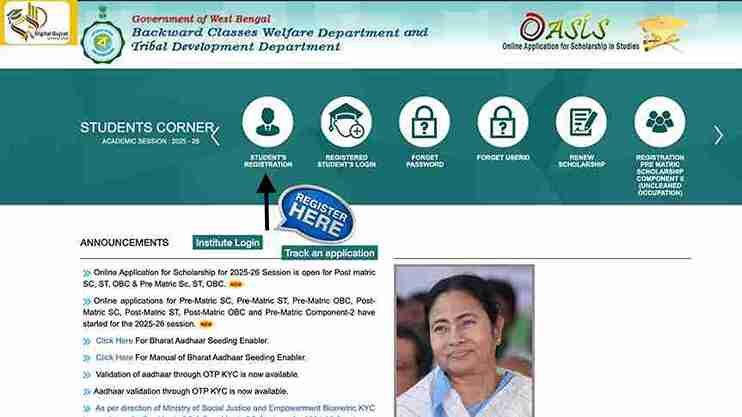
Student’s Registration on the Oasis portal. -
4
Select your district and verify your caste
- Select the district where your school or college is located.
- Enter your caste certificate number, issuing authority, issue date and category (SC, ST or OBC), then enter the captcha.
- Click Submit or I Agree, depending on the page layout.
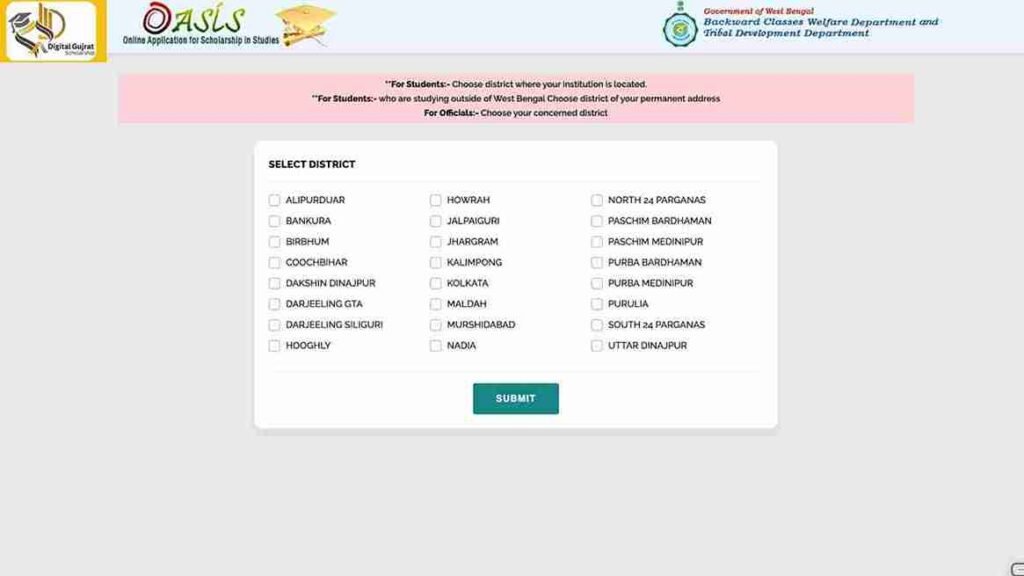
Choose your district and institute location. 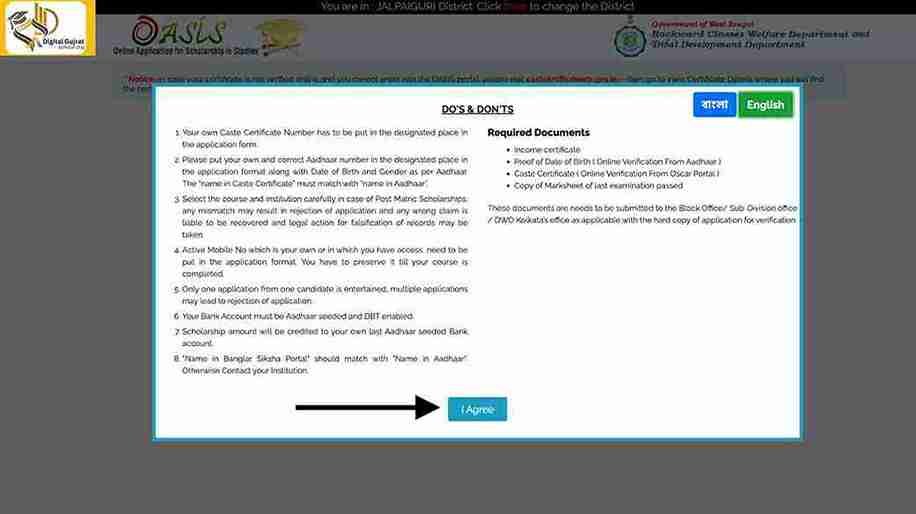
Click I Agree to proceed. 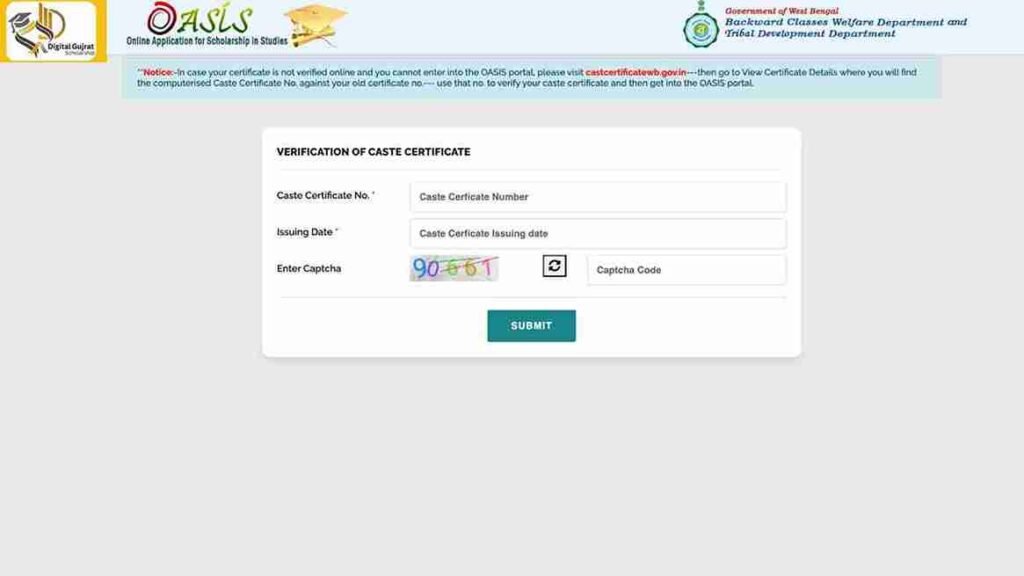
The portal checks your caste certificate against the government database. If you get a “caste certificate invalid” error: recheck the certificate number and issue date against the original. If they match, contact your district welfare office. -
5
Create your Oasis account
Fill in the registration form with your personal details (name as on Aadhaar, gender, date of birth, mobile, email), your permanent and present address, your category, and your school or college details. Submit the form, then note the Application ID / User ID that appears and set a password you will remember.
Keep the User ID and password safe. You need them to log in, check status and renew next year. -
6
Log in and start the scholarship application
Go to the login section, choose Registered Student’s Login, select your district again, and enter your User ID, password and captcha. From the dashboard, click Apply for Scholarship and choose the scheme that matches your class and category (for example Pre-Matric SC or Post-Matric OBC).
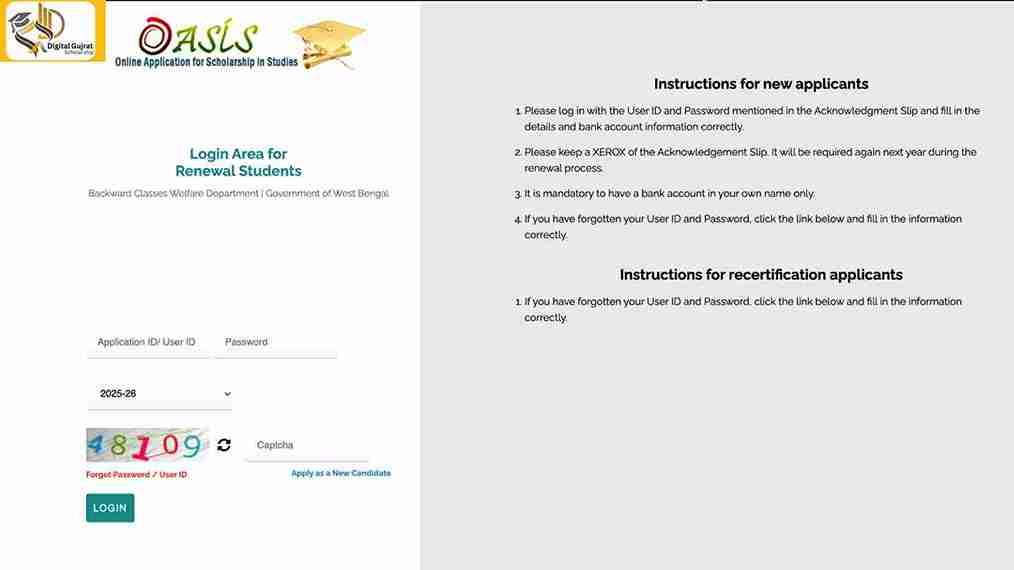
Log in with your registered User ID and password. -
7
Fill the application form, section by section
- Personal details: name, caste, date of birth and address must match your documents.
- Academic details: current class or course, stream, school or college name, board or university, roll and registration numbers, and marks from your last exam.
- Institution details: check the institute code, district and address. Outside-state institutions may need extra checks with your scholarship cell.
- Bank details: bank name, branch, IFSC, account number and account holder name, all copied exactly from your passbook.
Bank details are critical. One wrong digit in the IFSC or account number can delay your payment for months. If Aadhaar is not seeded with the account, ask your bank to enable DBT. -
8
Upload your documents
Upload your photo and signature, caste certificate, income certificate (current year), last marksheet, Aadhaar, and the front page of your bank passbook or a cancelled cheque. Add a hostel certificate, disability certificate or parent’s occupation proof only if they apply to you.
Before you upload: check the file size limit and format for each field. Use simple file names with no spaces. -
9
Review, save and lock the application
Use Save Draft if it is available. Go through every section once more, check that no mandatory field is blank, then click Submit or Lock Application. Once locked, most changes need help from your institute or the district office, so review carefully before you lock.
-
10
Print the acknowledgement and submit it physically
Download and print the application form or acknowledgement from the portal. Attach self-attested copies of your documents and hand them to your school or college for verification. Depending on your category and district, the BDO, Municipality or District Welfare Office may also need a copy.
Online submission alone is not enough. Most applications stay pending until the printed form is verified. -
11
Complete biometric KYC (SC students, where required)
If your college asks for it, visit your assigned Bangla Sahayata Kendra with your Aadhaar and documents to complete biometric KYC. Keep the proof and submit it to your college if requested.
How to renew Oasis scholarship online (year 2 onward)
If you already received the scholarship, do not create a new account. Renewal uses your old login.
- Go to oasis.gov.in and click Renew Scholarship or Registered Student’s Login.
- Select your district and log in with your old User ID and password.
- Choose the new academic year and move your academic details to your current class or course.
- Check your bank details. Keep the same DBT-enabled account unless you have changed bank.
- Upload your current income certificate and latest marksheet.
- Click Renew and Lock Application, print the renewed form, and submit it with updated documents to your institute.
How to check your Oasis scholarship status
- Open oasis.gov.in and click Registered Student’s Login, or use the status check link in the Students Corner.
- Log in with your User ID or Application ID and password, then open the application status or track application section.
- Download the acknowledgement slip from the portal if you need a copy for your college.
- If the status says “under verification” for a long time, first confirm that your printed form reached the institute, then ask your institute’s scholarship cell to check.
Common reasons for rejection and how to avoid them
| Problem | How to avoid it |
|---|---|
| Name mismatch across Aadhaar, bank, certificate and form | Copy the name exactly as printed on Aadhaar, and correct it in the bank account before you apply. |
| Wrong IFSC or account number, or a non-DBT account | Copy the details from your passbook. Ask the bank to confirm DBT and Aadhaar seeding. |
| Old or invalid caste certificate | Check the number and date. Revalidate older OBC certificates if the portal notice asks for it. |
| Blurred or partial uploads | Rescan in good light, with all four edges visible. |
| Printed form not submitted to the institute | Print, attach self-attested copies, and hand it in. Get the verification stamp. |
| Skipped biometric KYC (SC) or NSP OTR (ST) | Complete both before you apply, and keep the proof. |
| Income certificate not for the current year | Get a certificate issued for the current financial year. |
Frequently asked questions
How do I apply for the Oasis scholarship online for the first time?
Register as a student on oasis.gov.in, verify your caste certificate, create your User ID, log in, fill in the scholarship form, upload your documents, lock the application, print the acknowledgement, and submit it with your documents to your school or college.
Can I apply from my phone?
Yes, the portal works in mobile browsers. Use a clear scan from a scanner app, and remember that you still need to print and submit the form offline.
Do I need to submit a hard copy?
Yes. After online submission you must print the form, attach the supporting documents, and submit it to your institution for verification.
Can I use my parent’s bank account?
No. The bank account must be in your own name, because the scholarship is paid directly to the student through DBT.
Is biometric KYC compulsory for everyone?
Biometric KYC is currently being asked of SC students in the pre-matric and post-matric categories. Check the latest notice on the Oasis home page and from your college, because the rules can change.
Do I need a new account every year?
No. Use your old User ID and password to renew, select the new academic year, update your details, and lock the renewal.
My scholarship is stuck under verification. What should I do?
First confirm that your printed form reached your institute or the BDO, Municipality or DWO office. Then ask your scholarship cell to check, or visit your district welfare office.
Can I apply for Oasis if I am an OBC student in pre-matric?
Eligibility depends on the specific scheme and class. Check the eligibility guide for your category, because scheme rules differ for SC, ST and OBC students.
Ready to apply? Start at the official portal.
Related guides